Editing, Turning Off, and Deleting Actions
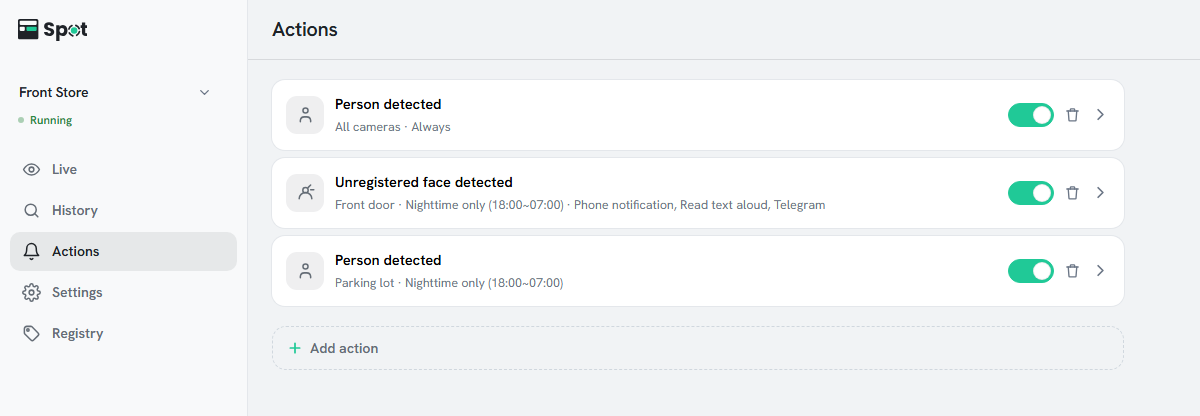
- Edit: click a row to open Edit action. Change the condition, actions, or schedule, then click Save.
- Turn off: click the switch on the row to turn the item off or on. An item that is turned off keeps its settings.
- Delete: click the trash icon at the right of the row, then Delete in the confirmation dialog. Saved recordings are kept.
After any change, click Save on the save bar at the bottom. If you changed only switches, the device usually does not restart; while it is running and connected, the change applies immediately.
What the second line of each row shows
The second line names the cameras: the camera name for one camera, n cameras for several, or All cameras when the place has two or more cameras and all of them are selected. The hours follow, and when the item has actions besides the phone notification, their names follow too (for example, Phone notification, Read text aloud).
Rows with a message on the second line
The message replaces the cameras and hours on the second line of the row. An item showing a message does not run, and its switch is also locked; clicking it has no effect. Fix the cause using the table below.
| Message | Cause | Resolution |
|---|---|---|
| Stopped: camera is off | Every camera the item watches is off. If only some are off, it keeps working on the others. | Turn the camera back on. |
| Stopped: face recognition is off | The item has a face condition, but face recognition is off. | Turn on Settings > Face recognition. The item returns to its previous state. |
| Stopped: person recognition is off | The item has a person condition, but person recognition is off. | Turn on Settings > Person recognition. |
| Stopped: vehicle recognition is off | The item has a vehicle condition, but vehicle recognition is off. | Turn on Settings > Vehicle recognition. |
| Stopped: animal recognition is off | The item has an animal condition, but animal recognition is off. | Turn on Settings > Animal recognition. |
A row labeled Record only, no alert is an older type of item, which keeps a record without running any action.