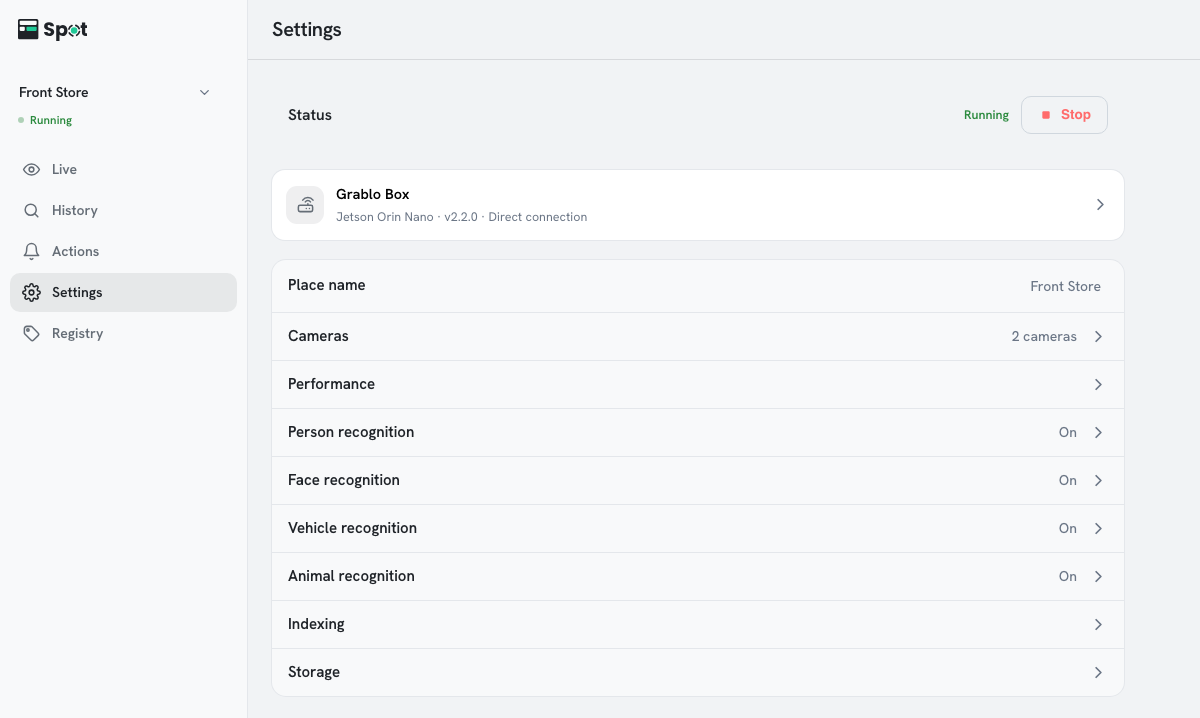
| Status | Starts and stops recording and analysis (see Starting, Stopping, and Saving Settings). |
| Device | The name, model, version, and connection type (Direct connection or Via relay server) of the connected device. With most home and office routers, the device connects directly, and live video over a direct connection doesn't count toward the relay server allowance. Clicking it opens Device Manager. |
| Place name | The place name shown on screen. Saved as soon as you finish typing. |
| Cameras | Adds, edits, and deletes cameras, and turns them on and off (see Adding a Camera). |
| Performance | Adjusts the AI processor and analyses per second (see Tuning Performance). |
| Person recognition | Turns person recognition on and off and adjusts the accuracy and threshold of person detection (see Person Recognition). Shows On or Off. |
| Face recognition | Turns face recognition on and off and adjusts the accuracy and threshold of face recognition (see Turning On Face Recognition). Shows On or Off. |
| Vehicle recognition | Turns vehicle recognition on and off and adjusts how plates are recognized (see Turning On Vehicle Recognition). Shows On or Off. |
| Animal recognition | Turns animal recognition on and off and adjusts animal detection (see Animal recognition). Shows On or Off. Available with device software 2.2.0 or later. |
| Indexing | Adjusts the quality of search and of the People cards (see Indexing Settings). |
| Storage | Sets the storage period, the free space to keep, and the storage folder (see Storage Period and Space). |
| Account | The account menu, shown on a phone only. |